Never miss a new load, on any load board.

LoadAlarm clicks refresh on your load boards and broker portals as often as every 30 seconds, even in background tabs. When new loads post, you hear it, see it, and can get it on your phone.

Add to Chrome Coming soon to the Chrome Web Store Try the demo board

Free for 7 days. No account needed to start.
Works on any load board or broker portal

  • DAT One
  • Truckstop
  • 123Loadboard
  • C.H. Robinson
  • J.B. Hunt 360
  • RXO
  • Arrive
  • Uber Freight
  • Any other board

There’s no list of supported sites. If a page has a refresh or search button and shows a load count or a list of loads, LoadAlarm can watch it.

Set up a board in about a minute

  1. Open your board

    Sign in and run the search you want to watch. Click the LoadAlarm icon, then Set up this site. Chrome asks you to allow that one site.

  2. Click Find automatically

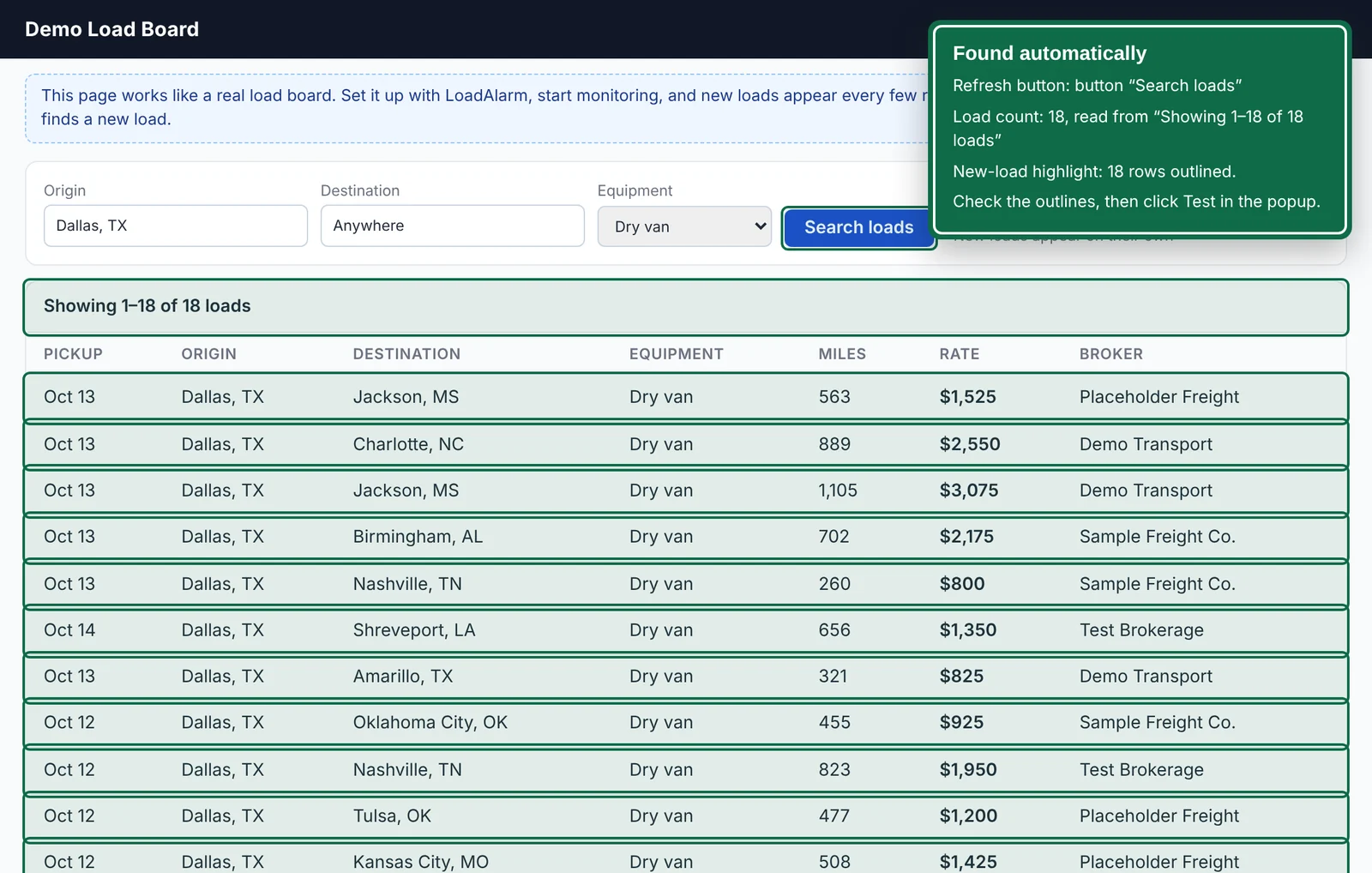
    LoadAlarm finds the refresh button, the load count, and the list of loads, and outlines them on the page. If it picks the wrong thing, point and click to fix it.

  3. Start monitoring

    Keep working in other tabs. LoadAlarm refreshes on your schedule and alerts you when the count changes.

The demo load board after Find automatically. A green panel lists the refresh button and the load count it found, and green outlines mark the count and each load row.

Know which board changed

With six boards open, a beep isn’t enough. LoadAlarm shows you where to look.

  • A tone for each board. Tell your boards apart by ear.
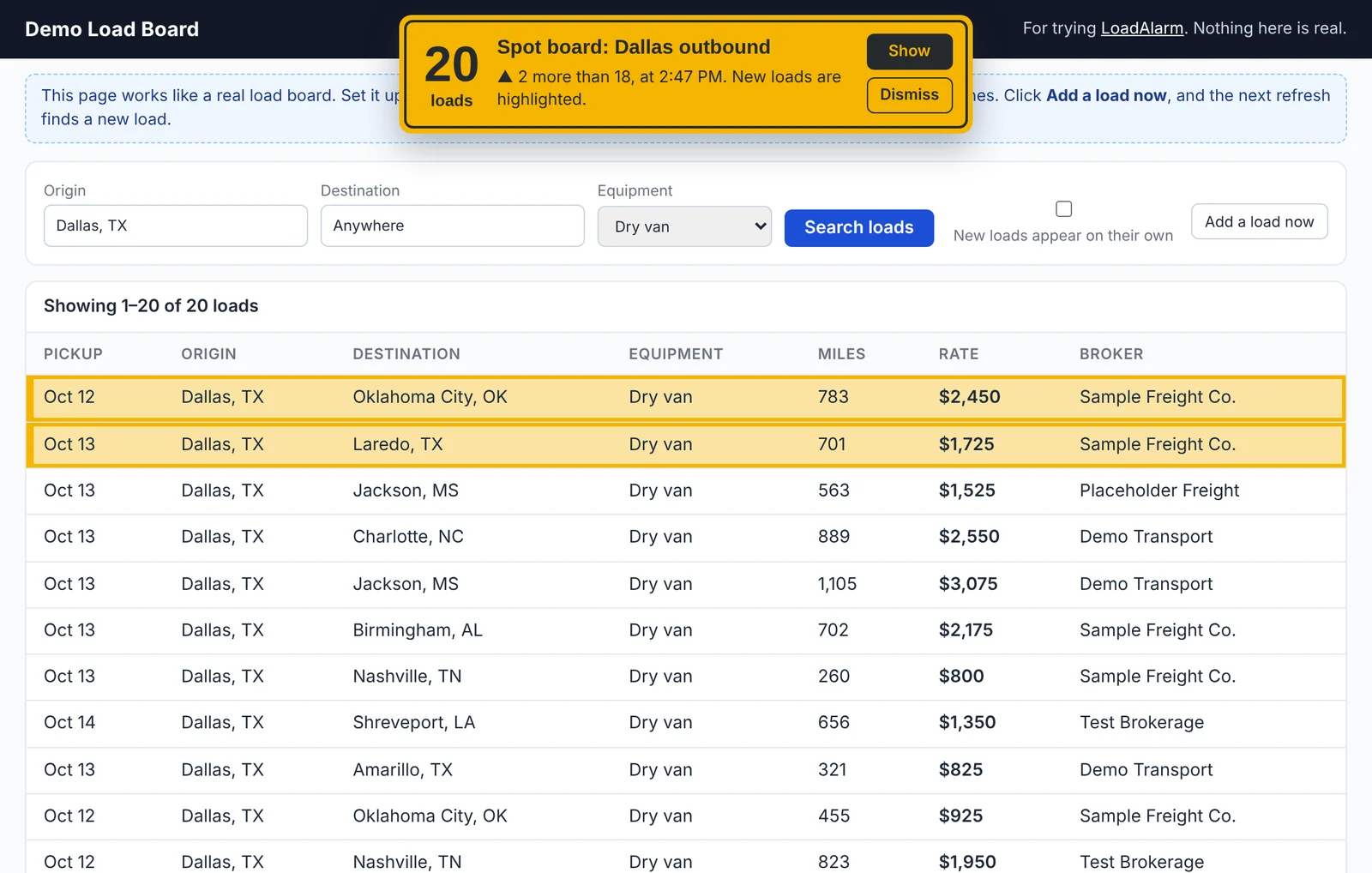
  • A flag on the tab. The title shows the change, like ▲ +2, until you look at it.
  • New loads outlined in amber. Spot them right away in a long list.
  • Desktop notifications. See the old and new counts, and click to jump to the tab.
The demo load board after two new loads posted. An amber sign at the top of the page reads 20 loads, 2 more than 18, and the two new rows have amber outlines.

Get load alerts on your phone

Step away from the desk without missing a load. LoadAlarm sends new-load alerts and sign-out warnings to your phone through the free ntfy app or Telegram.

Setup takes a couple of minutes. Alerts go from your computer to ntfy or Telegram, with no LoadAlarm server in between.

Included with a subscription

Made for a busy dispatch desk

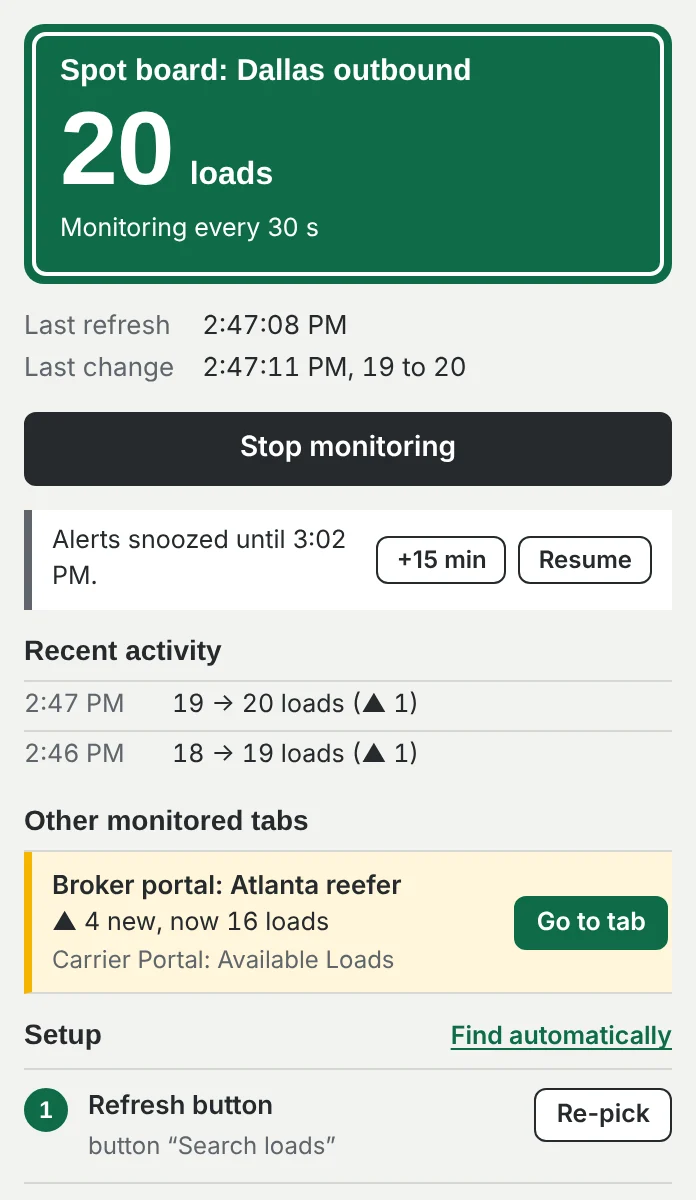
Snooze during calls
One click quiets alerts for 15 minutes. Monitoring keeps going.
Repeat until you look
Away from the screen? The alert plays again about once a minute until you check the tab.
Sign-out warning
If a board signs you out, you hear a warning and the tab is marked, so you can sign back in.
Every board at a glance
The popup lists every monitored tab, with the ones that changed first.
Activity log
Every change and problem on every board, with the time.
Private
No account, ads, or tracking. Your setups and loads stay on your computer.

One plan. Every board.

Try LoadAlarm free for 7 days. No account or card needed to start. When you’re ready, subscribe from the extension.

Phone alerts start when you subscribe.

LoadAlarm

One monthly price

after your 7-day free trial

  • Every load board and broker portal
  • As many boards and tabs as you run
  • Find automatically, tones, tab flags, and highlights
  • Phone alerts through ntfy or Telegram
  • Snooze, repeat alerts, and activity log
  • Email support
Add to Chrome Coming soon to the Chrome Web Store

Cancel anytime in LoadAlarm’s settings.

Questions

Does it work with my load board?

If your board has a refresh or search button and shows a load count or a list of loads, it should. That includes DAT, Truckstop, 123Loadboard, and broker carrier portals like C.H. Robinson, J.B. Hunt, RXO, and Arrive. Try it free on your own boards, or practice on the demo board first.

Do I need to keep the board open?

Yes. LoadAlarm works in your open Chrome tabs, including tabs in the background or on another monitor. Monitoring stops when you close Chrome.

Is refreshing this often allowed?

Some boards limit how often you can refresh. Choose an interval your board’s terms allow. The shortest interval is 30 seconds.

Does it work on Windows and Mac?

Yes. LoadAlarm runs in Google Chrome on Windows and Mac.

What happens after the free trial?

Monitoring pauses until you subscribe. Your board setups stay saved, so you pick up where you left off.

Where does my data go?

Your setups and loads stay on your computer, and there are no ads or tracking. If you turn on phone alerts, the alert text goes to ntfy or Telegram to reach your phone. Read the privacy policy.

How do I cancel?

Open LoadAlarm’s settings, go to Plan, and click Manage subscription. You keep access until the end of the period you paid for.

Your next load is posting right now.

Set up your first board, and let LoadAlarm watch it while you work.

Add to Chrome Coming soon to the Chrome Web Store Try the demo board